Products
OneLink Panel OneLink RADIUS Features Hosting models Pricing Book a demo How OneLink Panel works
Theme
Login
Panel login RADIUS login Start free
OneLink RADIUS · radius.onelink.pk

The complete RADIUS billing & network system for Pakistani ISPs.

FreeRADIUS PPPoE authentication, Mikrotik NAS control, resellers, Huawei OLT, fiber map, office & field staff, payments that verify themselves and a branded client app — one login, hosted on Shared Cloud, Separate Cloud or your own server.

FreeRADIUS + WireGuard Mikrotik API 3 hosting models User, Dealer & Staff apps
Real screens

Take the tour.

Click through the screens your office team uses every day — dashboard, users, customer profile, new connections, recovery, finance, reports, OLT and tasks.

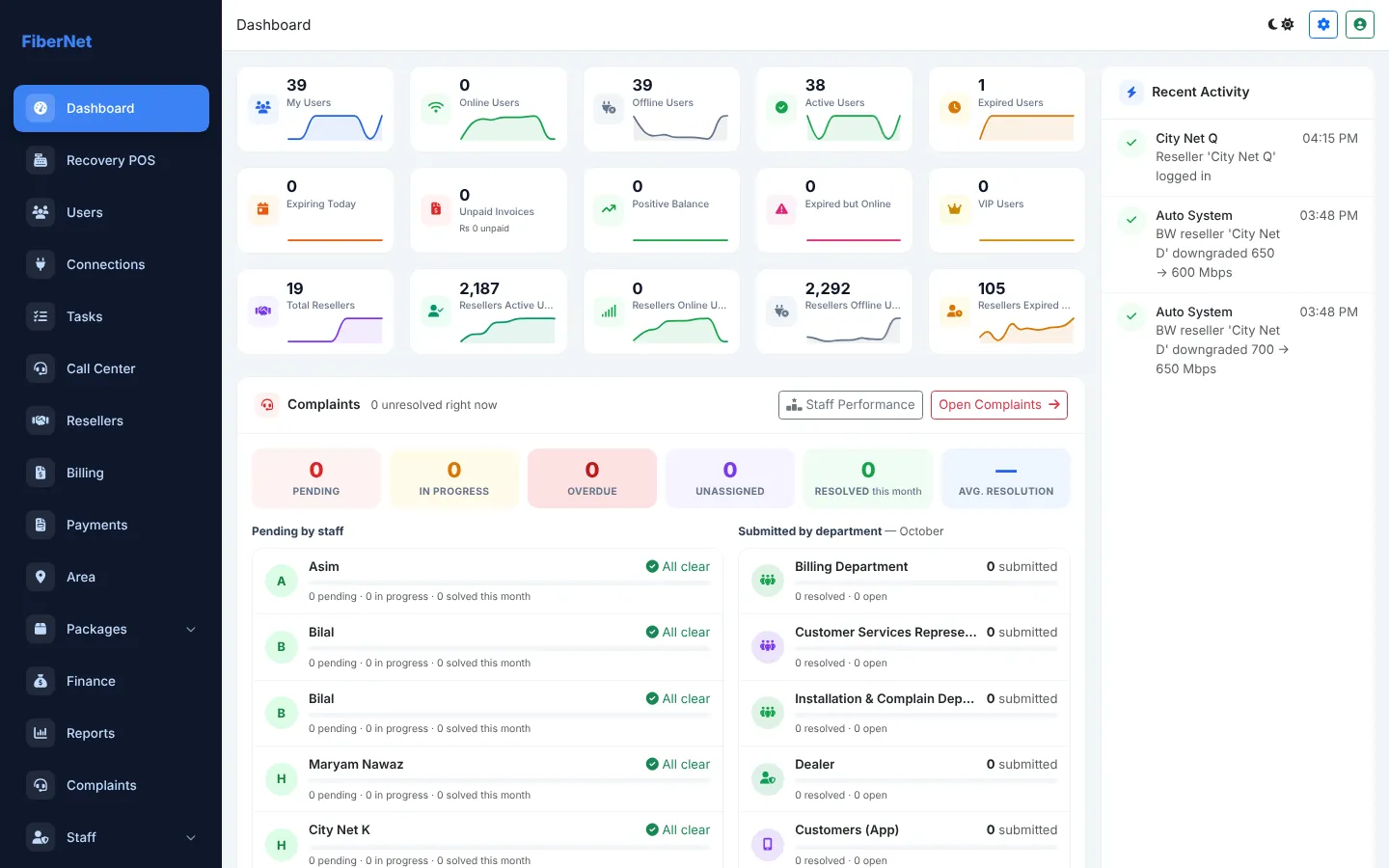
Dashboard

Your whole ISP on one screen

Online and offline users, expiring today, unpaid invoices, resellers and complaints by staff — the moment you log in.

  • Live counters with 7-day trends
  • Recent activity of your team and resellers
  • Complaints pending per staff member
radius.onelink.pk/dealer
OneLink RADIUS — Dashboard screen
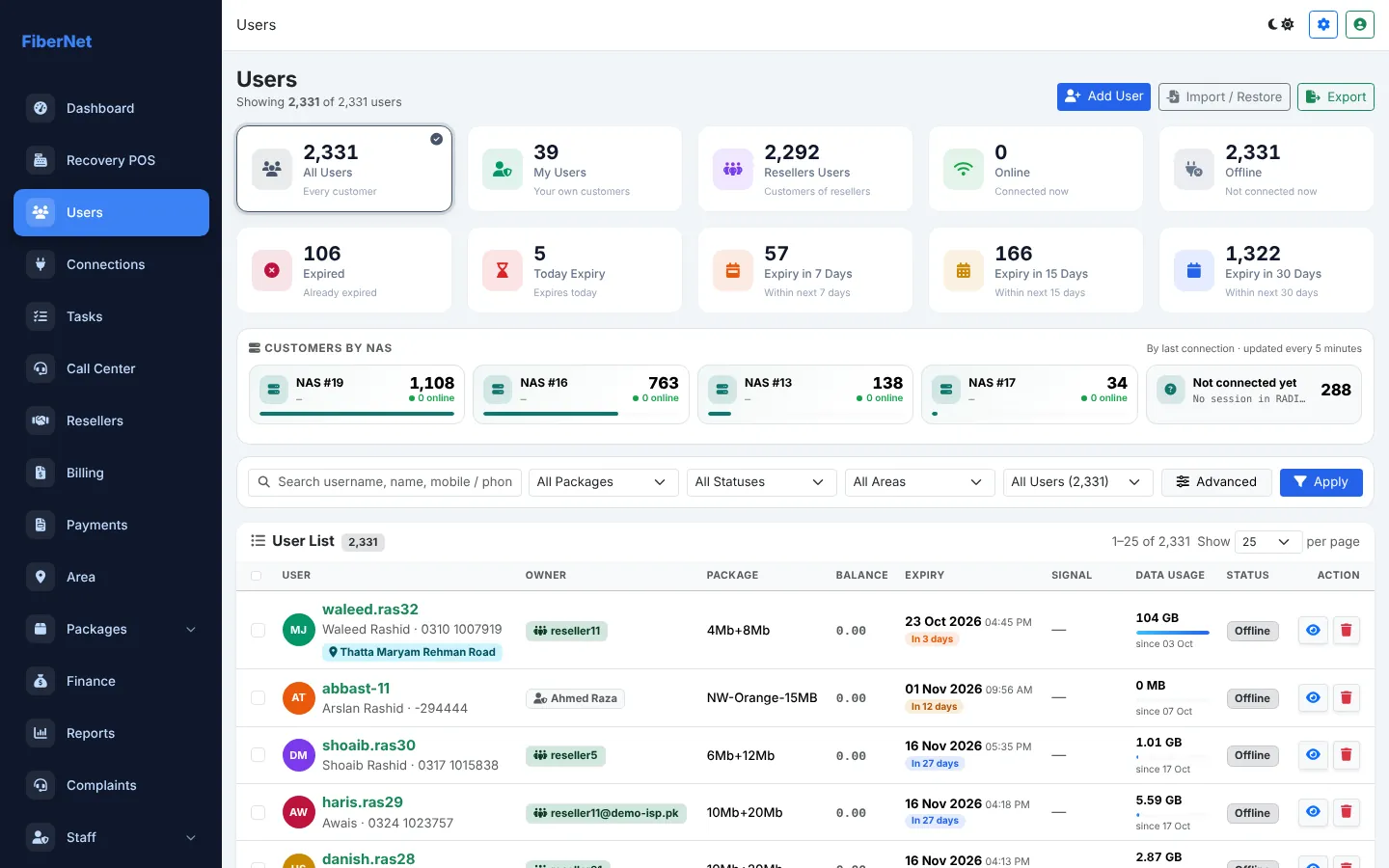
Users

Every PPPoE user, properly organised

Package, expiry, balance, data usage, owner and live status for thousands of users — filter by NAS, area, package or reseller.

  • Expiring today / 7 / 15 / 30 days at a glance
  • Customers by NAS with online counts
  • Bulk actions, import & export
radius.onelink.pk/dealer
OneLink RADIUS — Users screen
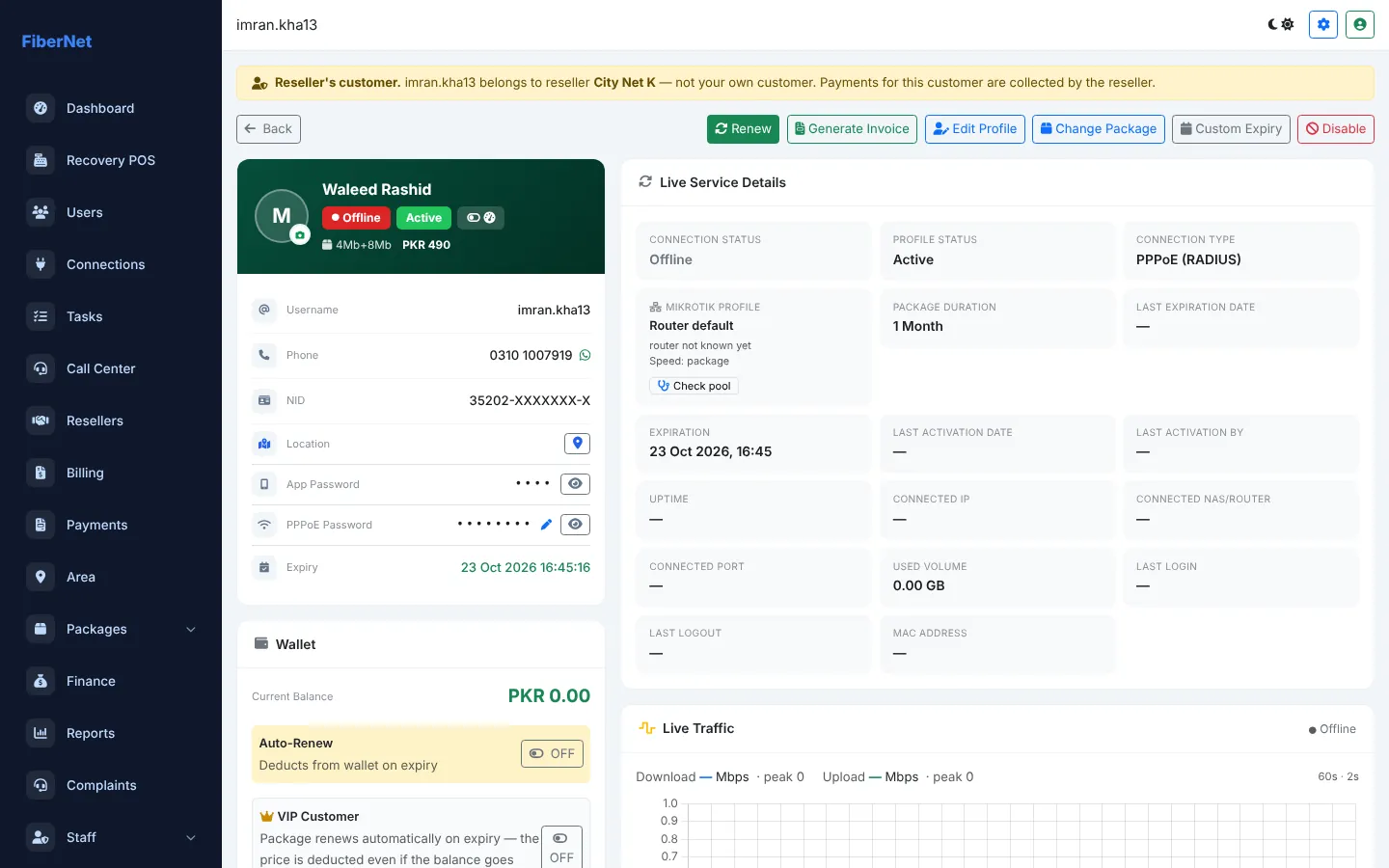
Customer profile

One page for everything about a customer

Renew, change package, generate invoice, wallet, auto-renew, VIP, MAC lock, live traffic and connection details.

  • Live service details from RADIUS & Mikrotik
  • Wallet, invoices and payment history
  • ONU signal & Wi-Fi from the OLT / ACS
radius.onelink.pk/dealer
OneLink RADIUS — Customer profile screen
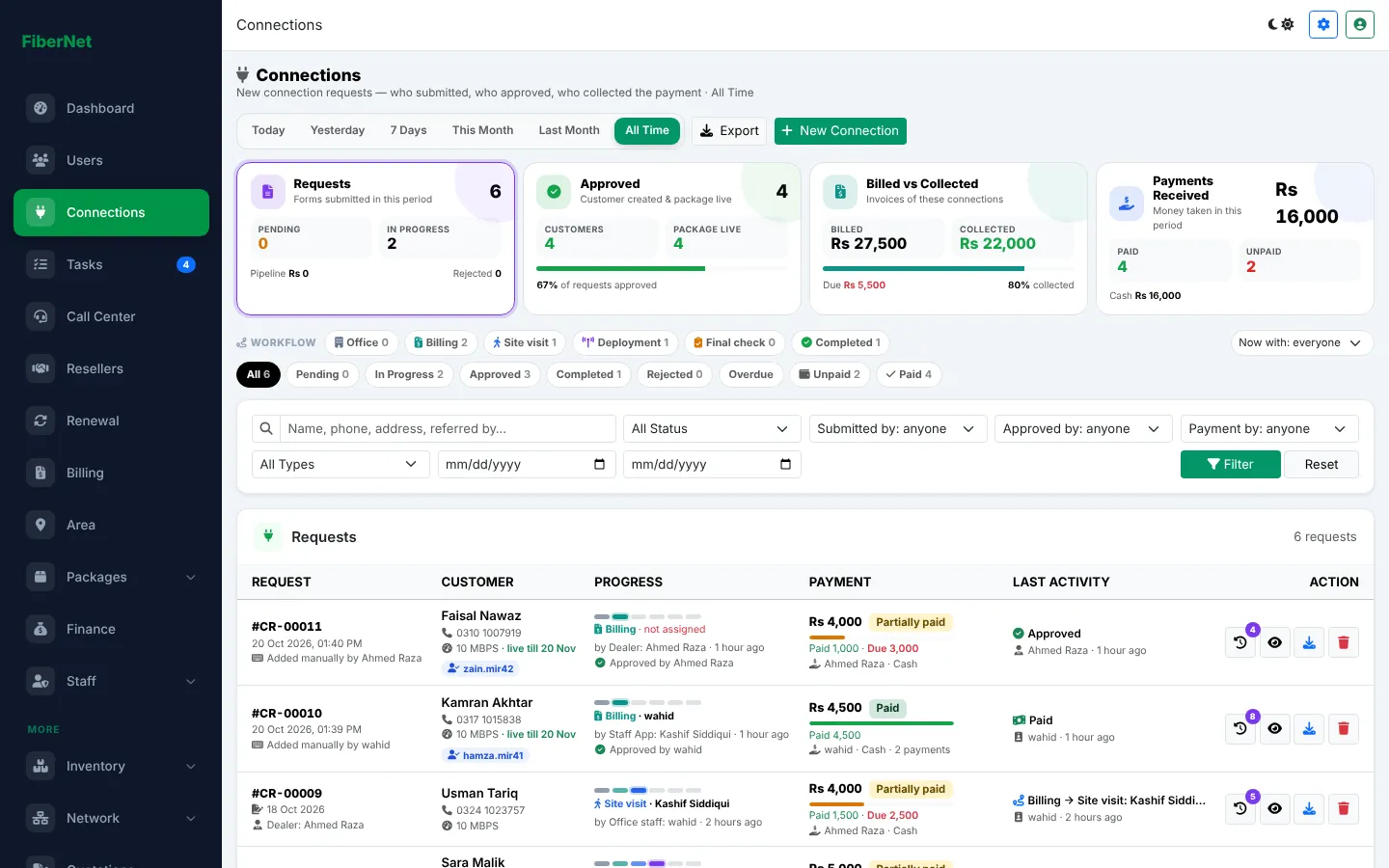
New connections

From form to installation — every step tracked

Office → Billing → Site visit → Deployment → Final check. See who has each request, what was paid and what is still due.

  • Paper form date, payment taken on the spot
  • Extra fiber added to the same invoice
  • Customer tracking link on WhatsApp
radius.onelink.pk/dealer
OneLink RADIUS — New connections screen
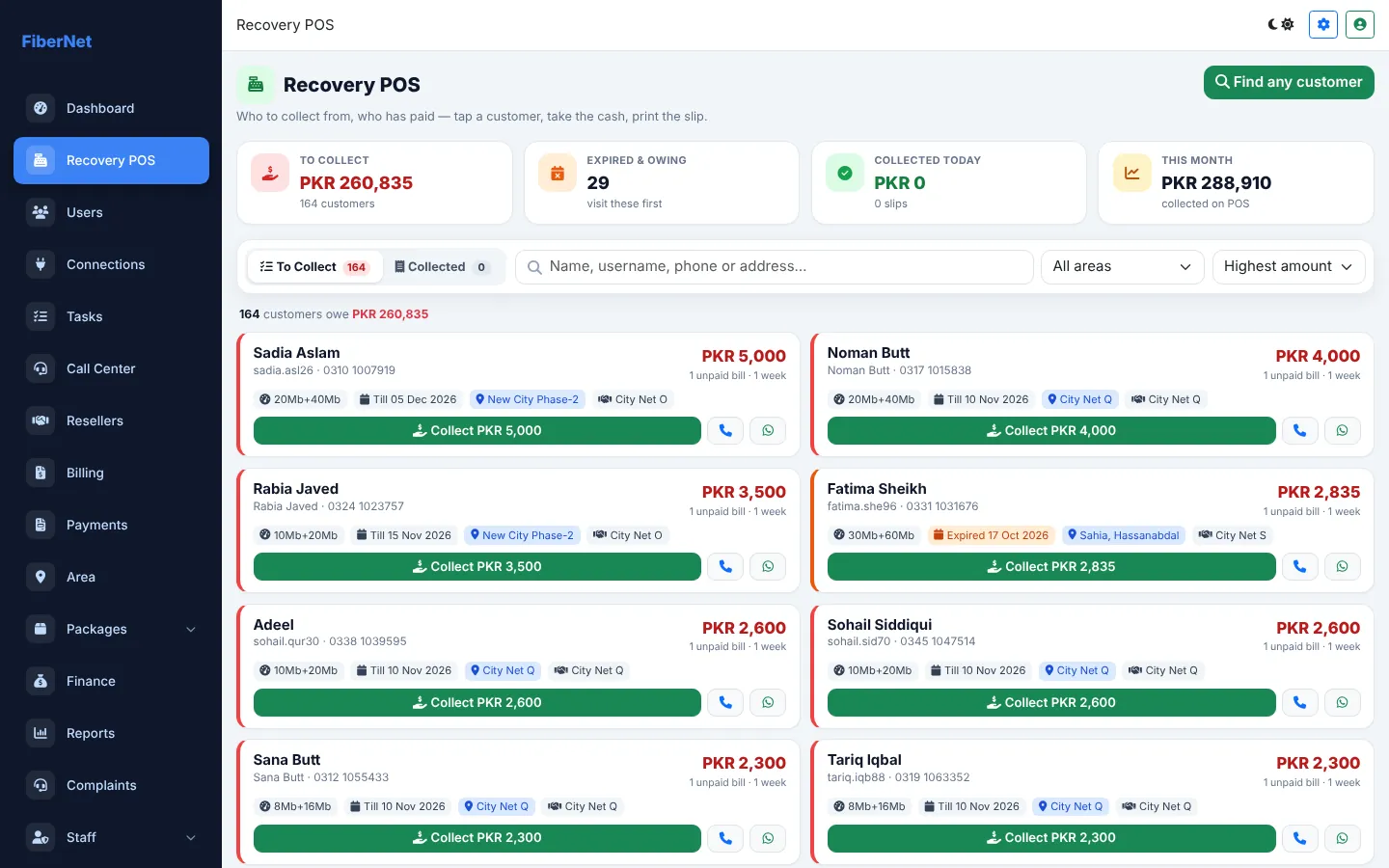
Recovery POS

Collect faster with Recovery POS

Who owes how much, sorted by amount — tap a customer, take the cash and print the slip. The cash lands in that collector's cash in hand.

  • To collect / expired & owing / collected today
  • Call & WhatsApp from the card
  • Printed slips and cash-in-hand per staff
radius.onelink.pk/dealer
OneLink RADIUS — Recovery POS screen
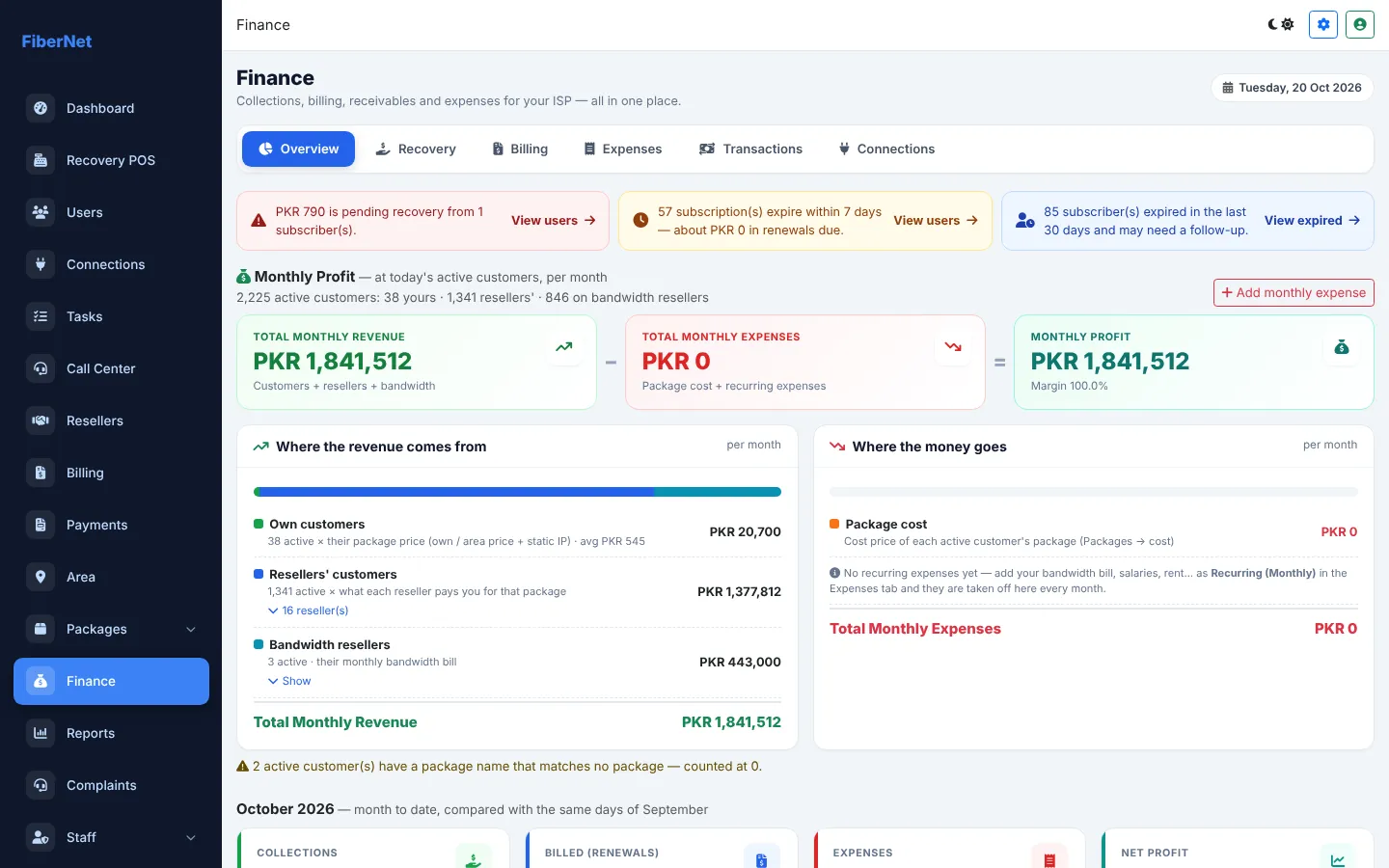
Finance

Know your real monthly profit

Revenue from your own customers, resellers and bandwidth resellers against package costs and expenses.

  • Monthly revenue, expenses and margin
  • Recovery, billing and transactions tabs
  • Alerts for pending recovery and expiries
radius.onelink.pk/dealer
OneLink RADIUS — Finance screen
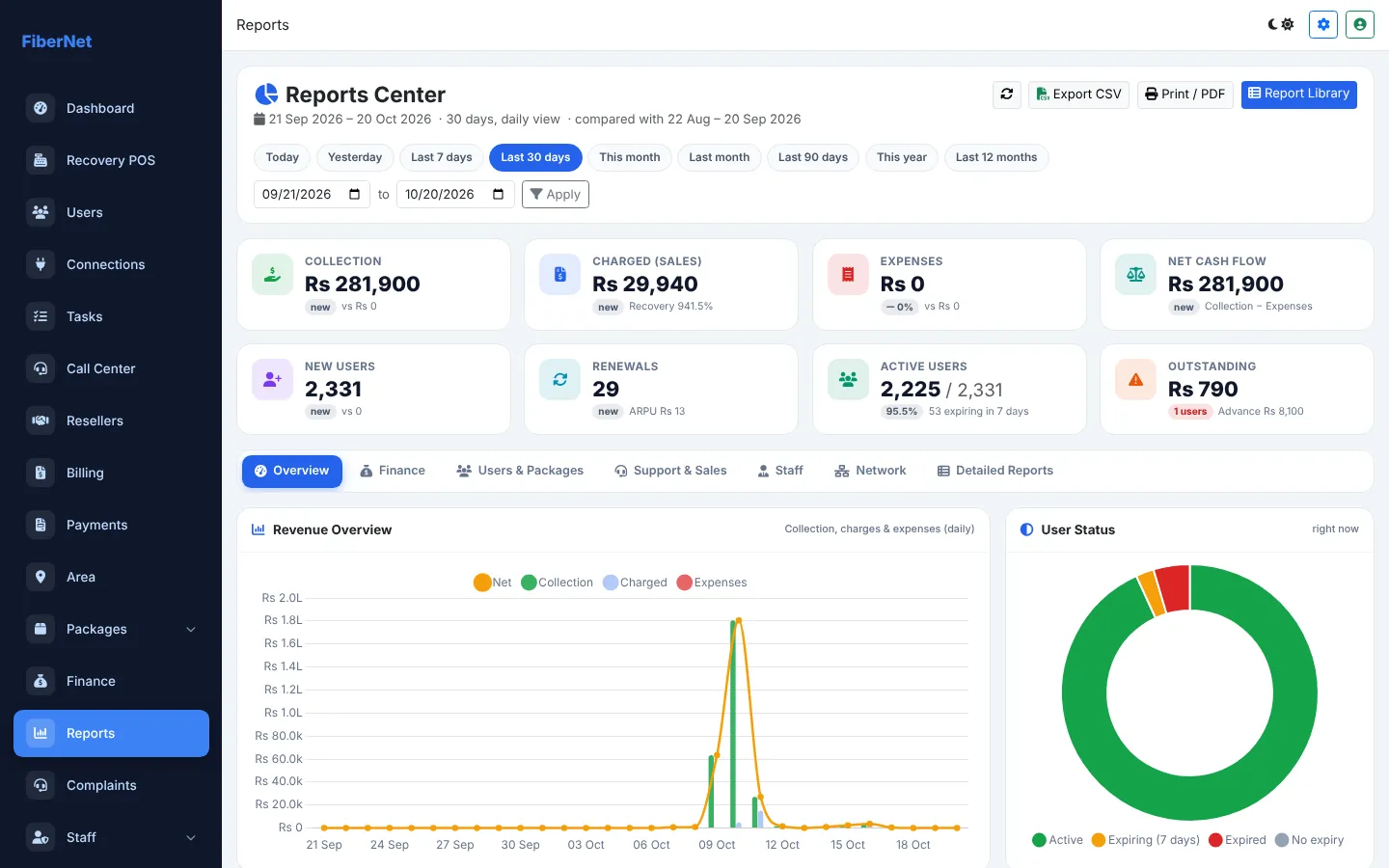
Reports

Reports you can actually use

Collection, sales, renewals, new and active users — any period, compared with the period before, with CSV and print.

  • Revenue overview chart
  • User status breakdown
  • Finance, staff, network & detailed reports
radius.onelink.pk/dealer
OneLink RADIUS — Reports screen
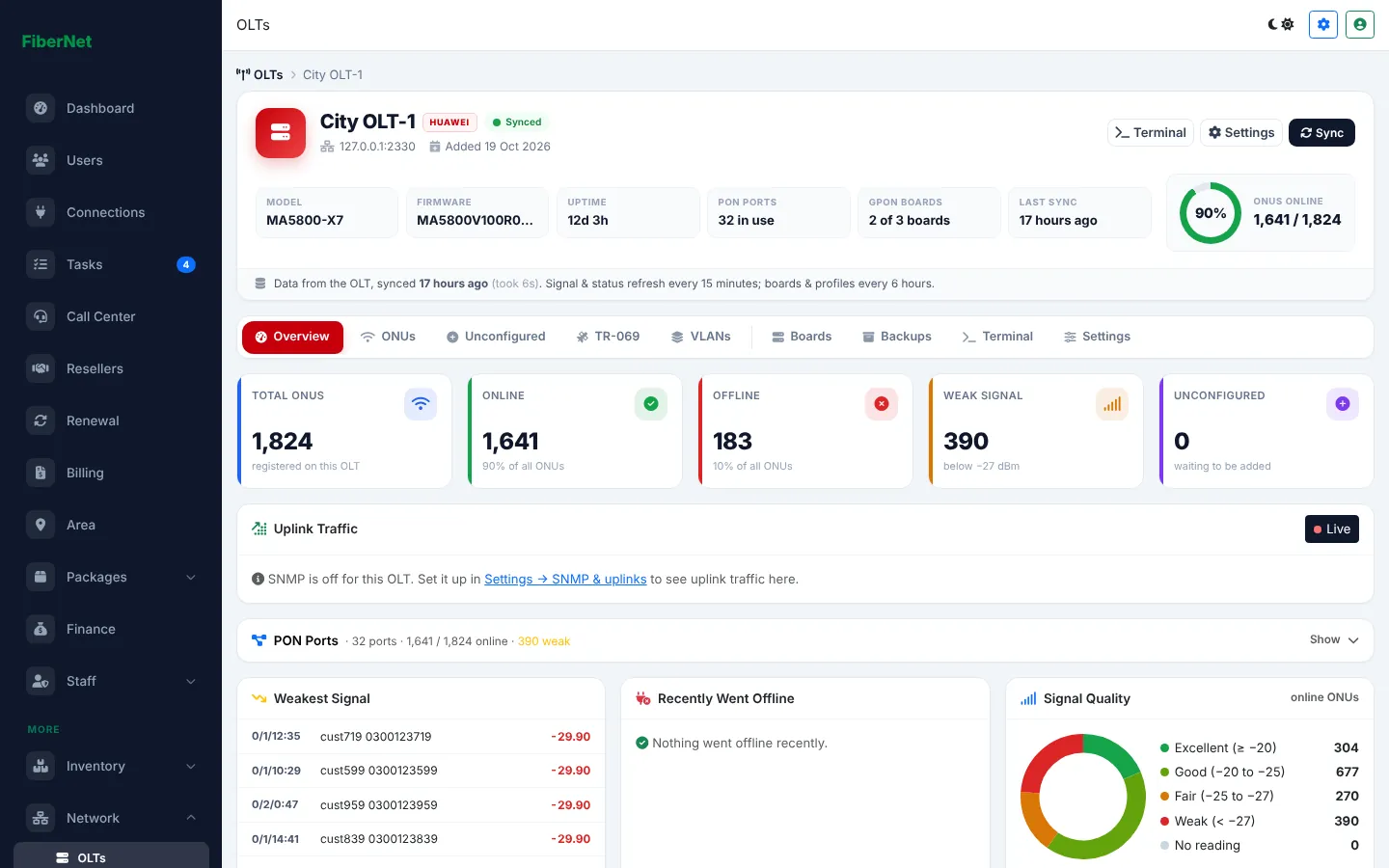
OLT & ONU

Your fiber network, live

Huawei OLT with every ONU — online / offline, weak signal, PON ports and the weakest customers — synced on its own.

  • Signal quality chart & weakest ONUs
  • Unconfigured ONUs, VLANs, boards & backups
  • TR-069 / GenieACS for Wi-Fi changes
radius.onelink.pk/dealer
OneLink RADIUS — OLT & ONU screen
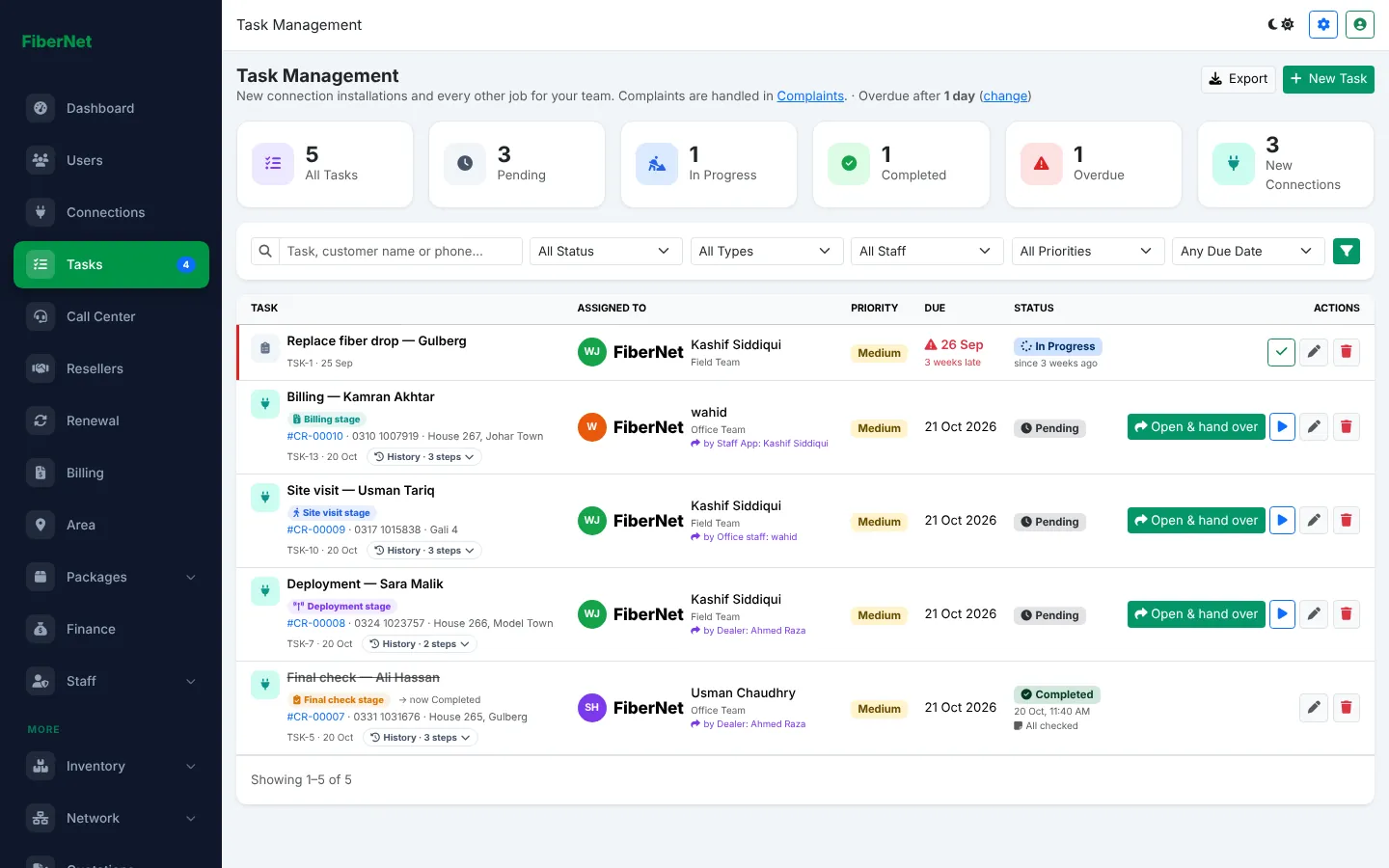
Tasks

Every job with its owner and history

One row per connection or job: who has it now, who assigned it, and the full stage history on click.

  • Staff see only their own tasks
  • "Open & hand over" to the next stage
  • Overdue jobs highlighted
radius.onelink.pk/dealer
OneLink RADIUS — Tasks screen
Go live in four steps

From sign-up to your first PPPoE login.

01 / SIGN UP

Pick your hosting

Create your account and choose Shared Cloud, Separate Cloud or On-Premise.

02 / CONNECT

Add your Mikrotik

The setup wizard gives you a ready script — your router joins over WireGuard and starts using OneLink RADIUS.

03 / IMPORT

Bring your users

Create packages, import users in bulk or sync them from the router, and add resellers and staff.

04 / LAUNCH

Go live with apps

Share the client app, turn on WhatsApp alerts and payment methods — renewals run by themselves.

Features

Everything an ISP runs on — in one system.

Every feature below is included on all three hosting models.

RADIUS & PPPoE users

FreeRADIUS AAA
  • PPPoE authentication through FreeRADIUS with live online / offline sessions
  • Packages & speed policies — speed schedules (night boost), package policies and package transfer
  • MAC lock, static IPs and static IP pools with their own monthly charge
  • Bulk user creation, import and sync from your router
  • Expired page — expired users land on a page where they can pay and reconnect themselves

Mikrotik NAS management

RouterOS API · WireGuard
  • Network setup wizard — ready RouterOS script, router joins over a secure WireGuard tunnel
  • Live traffic graphs per interface, per queue and per user
  • Queues, VLAN binding and static pools managed from the panel
  • Router backups and Live IP view
  • Laptop VPN for remote access to your network

Billing & auto renewal

Wallets · invoices · recovery
  • Wallet-based auto renewal — renews the moment the balance is enough
  • Area-based & custom per-user pricing
  • Invoices & quotations with your own templates, logo and bank details
  • Recovery POS — field staff collect cash, print slips, track cash in hand
  • Expiry reminders and post-expiry follow-ups on WhatsApp

Payments that verify themselves

JazzCash · Easypaisa · banks
  • Screenshot OCR reads TID and amount from the payment proof
  • Duplicate & fraud detection — same image or TID flagged as Suspicious
  • OneLink Forwarder matches JazzCash, Easypaisa & bank SMS to payments automatically
  • Online gateways and multiple payment methods per ISP
  • Approval trail — who submitted, who approved, from where

Resellers & sub-dealers

Panel · bandwidth · franchise
  • Panel resellers with their own login, users, wallet and assigned packages
  • Bandwidth resellers — Mbps billing, invoice & due dates, live traffic of their queue
  • Reseller wallets, add fund with proof, advance & cash entries
  • Trust score, notices, automation and per-reseller feature switches
  • Sub-dealer management with their own portal

Fiber, OLT & wireless

Huawei OLT · GenieACS · UBNT
  • Huawei OLT & ONU — status, optical power, reboot, per-user ONU view
  • Wi-Fi name & password change via GenieACS — from the panel or the user's own app
  • Fiber map — cables, cores, splitters, splitter ports and distribution boxes
  • Network map of your OLTs, boxes and customers
  • Wireless — UBNT devices and towers

Office & field staff

Roles · apps · tracking
  • Office team with role-based permissions on every page
  • Field team app — check-in, live location tracking and assigned jobs
  • Complaints with assignment, resolution, customer rating and reports
  • Tasks, office duty (attendance) and phone diary
  • Activity log of who did what

New connections

Public form · tracking
  • Public & private connection forms with your branding
  • GPS location — current location or paste a Google Maps link
  • Tracking link on WhatsApp & email — the customer sees status and who is assigned
  • Connection invoices and installation charges

Notifications & branding

WhatsApp · email · white-label
  • WhatsApp & email alerts — payment received, expiry, renewal, complaint updates
  • Campaigns to all or selected customers
  • Your brand everywhere — logo, colours and name on invoices, slips, messages and pages
  • Daily reports to the owner's WhatsApp at the time you choose

Finance, reports & inventory

Revenue · expenses · stock
  • Finance dashboard — revenue received, expenses and real profit
  • Expenses and staff cash collection
  • Reports for users, recovery, packages, complaints and staff
  • Inventory — stock in and out, issued to staff and customers

Syslog & compliance

User logs · retention
  • OneLink Syslog — user connection logs collected from your routers
  • Search by user, IP and time when you are asked for records
  • Runs on your own server on Separate Cloud and On-Premise

Reliability & security

Backups · updates · migration
  • Automatic backups and one-click restore of packages and maps
  • Automatic updates — new features arrive on their own
  • Server migration tool to move to your own server later
  • Your subscribers stay online — a OneLink billing issue never cuts their internet
Apps included

An app for everyone who touches your network.

Client App

Your customers recharge, renew, change package, see live usage, change Wi-Fi password and file complaints — in your brand.

Dealer App

Approve payments, renew users, collect cash and check reports from your phone — for you and your office staff.

Staff App

Field team check-in, live tracking, assigned complaints and new connections with photos and location.

OneLink Forwarder

Forwards JazzCash, Easypaisa and bank SMS so payments are matched and approved automatically.

Staff App · field team

Your field team gets the job, the address and the money to collect.

Every visit and installation lands in the right person's Staff App with the customer's location, bill, what is already paid and what to collect. They add extra fiber on the spot, take the cash and hand the job to the next stage.

  • Only their own tasks — nobody sees jobs given to someone else.
  • Adjust charges — extra cable goes on the same invoice, the customer sees what is still due.
  • Collect & cash in hand — cash collected is recorded against the person who took it.
  • Hand over — Site visit → Deployment → Final check, with the customer updated on WhatsApp.
Hosting models

Same features. Three places to run them.

We recommend Separate Cloud — a dedicated server only for your ISP, fully managed by OneLink.

Shared Cloud

Start in minutes

Runs on the OneLink cloud — nothing to install. Perfect to start today.

Sign up — Shared Cloud
30-day free trial, then free while you have up to 100 active users.

On-Premise

Your own server · your office

One-command install on your hardware. RADIUS keeps working offline.

Sign up — On-Premise
Sign up and get your install command and activation key.

Full details & comparison

FAQ

OneLink RADIUS — common questions.

Do I need a separate billing panel with OneLink RADIUS?

No. OneLink RADIUS is the billing panel — it has its own FreeRADIUS server and manages users, packages, payments and renewals directly on your Mikrotik routers.

Which Mikrotik routers are supported?

Any RouterOS device that can run PPPoE server and WireGuard (RouterOS v7). The setup wizard generates the script for your router; OneLink then uses the RouterOS API for live sessions, queues and traffic graphs.

Can I import my existing users?

Yes. Users can be imported in bulk or synced from your router's PPP secrets, and packages can be created or merged before you go live.

Does it support resellers who buy bandwidth from me?

Yes. Bandwidth resellers are billed per Mbps with their own invoice and due dates, can add funds with payment proof, and — if you allow it — can see the live traffic of their queue on your router.

Which OLTs are supported?

Huawei OLTs are supported today for ONU status, optical power and reboot. Wi-Fi name and password changes work through GenieACS (TR-069) on supported ONUs.

Which hosting model do you recommend?

Separate Cloud for most ISPs: a dedicated server only for your ISP with your own RADIUS and database, set up, monitored and updated by OneLink. Shared Cloud is the quickest start; On-Premise suits ISPs with their own server and IT team. Separate Cloud is also the fastest model — fully optimized and CDN-based — and keeps your panel, apps and recovery running even when your office internet is down.

Start today

Put your ISP on OneLink RADIUS.

Sign up, connect your first Mikrotik and see your users online — free for 30 days, then free up to 100 active users.